
主题
规划模式
本章目标
把复杂目标拆成结构化子任务,识别依赖并根据真实执行结果重新规划;分清“有计划”和“已完成”。
前置:工具调用、可信 Agent。JSON 是表示对象和列表的文本格式,Pydantic 可验证其中字段是否满足类型要求。
补充讲解:先做哪一步,不只是列表顺序
“安排七天巴黎旅行,预算 5000 美元”包含日期、航班、酒店和活动。活动预订必须在旅行日期确定后,酒店入住时间依赖航班到达时间。规划(Planning)要表达这些依赖,而不只是生成一个好看的编号清单。
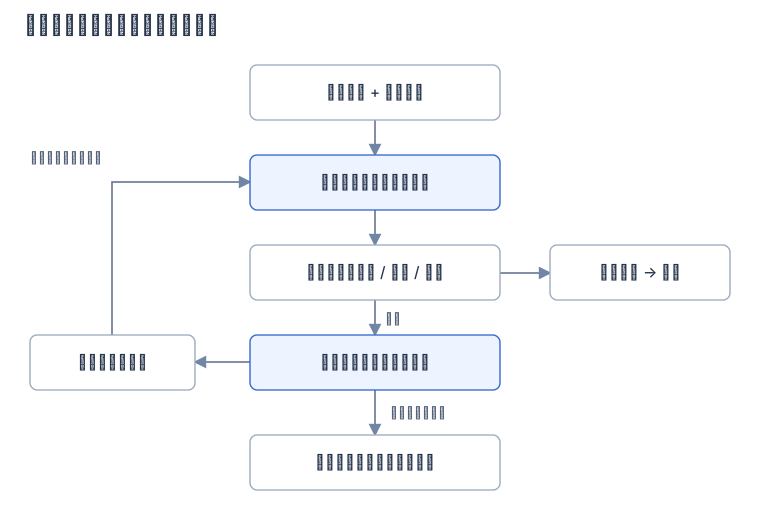
图:补充绘制。失败后回到规划,仍受次数限制;非法计划在执行之前被拒绝。
一个最小子任务记录可有 task_id、description、assigned_agent、priority、dependencies 和运行状态。assigned_agent 必须来自实际角色注册表;模型不能凭空创造一个已经接入业务的角色。
原课程代码片段的阅读范围
下方精读保留上游主要知识与片段,可能包含历史 SDK 写法、示意端点及未完整定义的函数;这些片段不等同于经过本站验证的完整程序。运行前优先阅读本章实际 Notebook 导读与版本校订。已验证的无 API 实验在“扩展实践”中另行标明。
原课程精读:规划设计
介绍
本课将涵盖
- 明确定义整体目标和将复杂任务拆分成可管理的子任务。
- 利用结构化输出实现更可靠且机器可读的响应。
- 采用事件驱动方法处理动态任务和意外输入。
学习目标
完成本课后,你将了解:
- 识别并设定AI Agent 的整体目标,确保其清晰知道需要完成的任务。
- 将复杂任务拆解成可管理的子任务并按逻辑顺序组织。
- 装备 Agent 合适的工具(如搜索工具或数据分析工具),决定何时及如何使用,并处理意外情况。
- 评估子任务结果,衡量性能,并迭代行动以提升最终输出。
定义整体目标及拆解任务
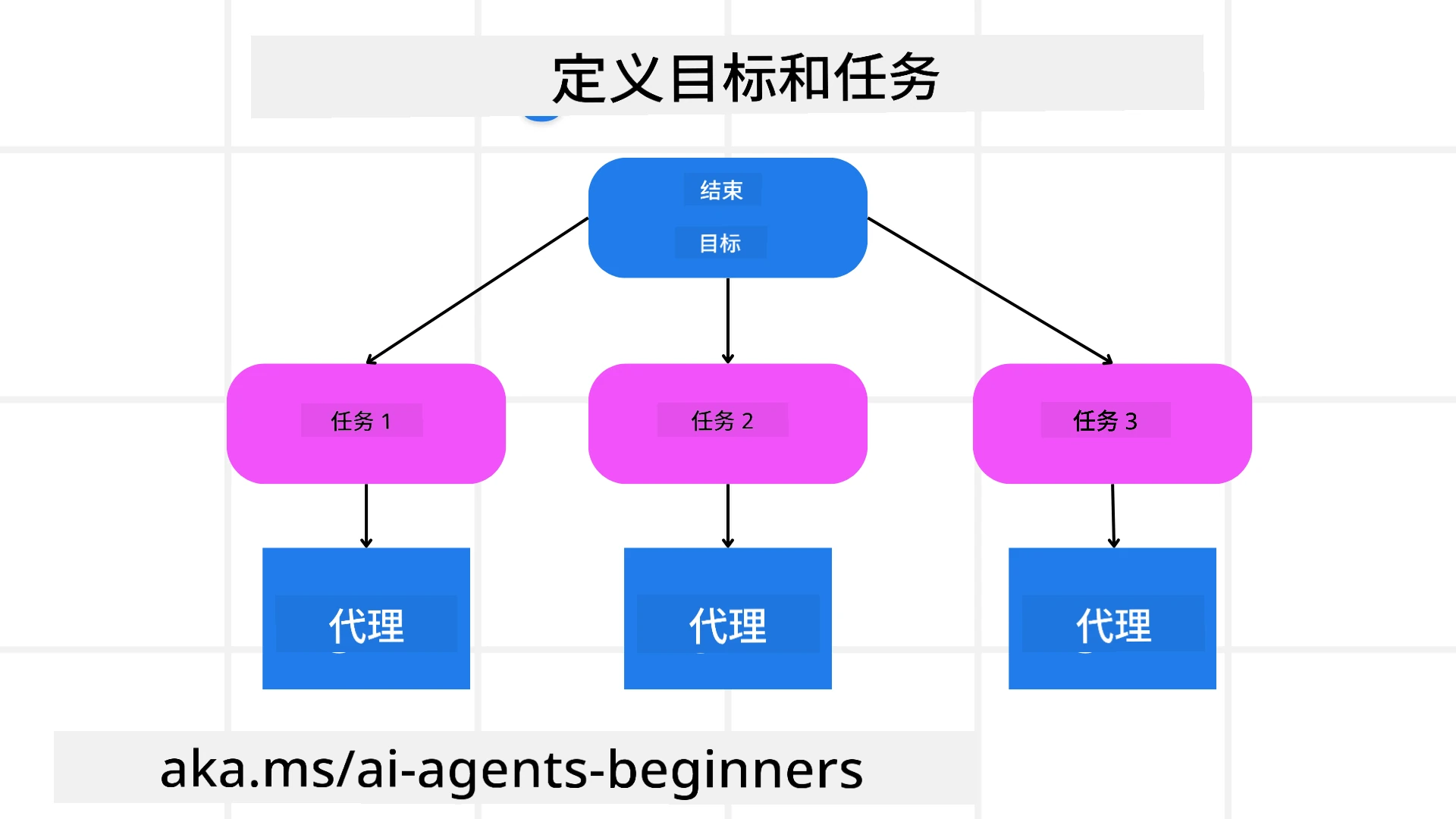
图:定义目标与任务。来源:Microsoft AI Agents for Beginners,MIT。
现实中的大多数任务过于复杂,无法通过一步完成。AI Agent 需要一个简明的目标来指导其规划和行动。例如,考虑这个目标:
“生成一份三天的旅行行程。”
虽然这个目标简单,但仍需细化。目标越明确,Agent(及任何人类协作者)就越能专注于实现正确的结果,比如创建包含航班选项、酒店推荐和活动建议的全面行程。
任务拆解
将大型或复杂任务拆成更小的有目标子任务后,更易管理。 对于旅行行程示例,可以将目标拆分为:
- 机票预订
- 酒店预订
- 租车
- 个性化定制
每个子任务可以由专门的 Agent 或流程处理。一个 Agent 可能专门负责搜索最佳机票,另一个专注于酒店预订等。协调或“下游”Agent 可以将结果汇总成一份完整的行程提供给用户。
这种模块化方法也便于逐步增强。例如,可以添加专门的美食推荐或本地活动建议 Agent,并随着时间推进行程优化。
结构化输出
大语言模型(LLM)能够生成结构化输出(如JSON),使下游 Agent 或服务更易解析和处理。这在多 Agent 上下文中特别有用,我们可以在规划输出完成后执行相应任务。
以下Python代码演示了一个简单的规划 Agent 如何拆解目标为子任务并生成结构化计划:
python
from pydantic import BaseModel
from enum import Enum
from typing import List, Optional, Union
import json
import os
from typing import Optional
from pprint import pprint
from agent_framework.foundry import FoundryChatClient
from azure.identity import AzureCliCredential

class AgentEnum(str, Enum):
    FlightBooking = "flight_booking"
    HotelBooking = "hotel_booking"
    CarRental = "car_rental"
    ActivitiesBooking = "activities_booking"
    DestinationInfo = "destination_info"
    DefaultAgent = "default_agent"
    GroupChatManager = "group_chat_manager"

# Travel SubTask Model
class TravelSubTask(BaseModel):
    task_details: str
    assigned_agent: AgentEnum  # we want to assign the task to the agent

class TravelPlan(BaseModel):
    main_task: str
    subtasks: List[TravelSubTask]
    is_greeting: bool

provider = FoundryChatClient(
    project_endpoint=os.environ["AZURE_AI_PROJECT_ENDPOINT"],
    model=os.environ["AZURE_AI_MODEL_DEPLOYMENT_NAME"],
    credential=AzureCliCredential(),
)

# Define the user message
system_prompt = """You are a planner agent.
    Your job is to decide which agents to run based on the user's request.
    Provide your response in JSON format with the following structure:
{'main_task': 'Plan a family trip from Singapore to Melbourne.',
 'subtasks': [{'assigned_agent': 'flight_booking',
               'task_details': 'Book round-trip flights from Singapore to '
                               'Melbourne.'}
    Below are the available agents specialised in different tasks:
    - FlightBooking: For booking flights and providing flight information
    - HotelBooking: For booking hotels and providing hotel information
    - CarRental: For booking cars and providing car rental information
    - ActivitiesBooking: For booking activities and providing activity information
    - DestinationInfo: For providing information about destinations
    - DefaultAgent: For handling general requests"""

user_message = "Create a travel plan for a family of 2 kids from Singapore to Melbourne"

response = client.create_response(input=user_message, instructions=system_prompt)

response_content = response.output_text
pprint(json.loads(response_content))多 Agent 编排的规划 Agent
示例中,一个语义路由 Agent 接收用户请求(例如,“我需要一份旅行酒店计划。”)。
然后规划者执行:
- 接收酒店计划:规划者根据系统提示(含可用 Agent 详情)处理用户消息,生成结构化的旅行计划。
- 列出 Agent 及其工具:Agent 注册表包含 Agent 列表(如机票、酒店、租车和活动 Agent)及其功能或工具。
- 路由计划给相应 Agent:根据子任务数量,规划者或将消息直接发给专门 Agent(单任务场景),或通过群聊管理器协调多 Agent 协作。
- 总结结果:最后规划者总结生成的计划以便清晰展示。 以下Python代码示例展示了这些步骤:
python
from pydantic import BaseModel

from enum import Enum
from typing import List, Optional, Union

class AgentEnum(str, Enum):
    FlightBooking = "flight_booking"
    HotelBooking = "hotel_booking"
    CarRental = "car_rental"
    ActivitiesBooking = "activities_booking"
    DestinationInfo = "destination_info"
    DefaultAgent = "default_agent"
    GroupChatManager = "group_chat_manager"

# Travel SubTask Model

class TravelSubTask(BaseModel):
    task_details: str
    assigned_agent: AgentEnum # we want to assign the task to the agent

class TravelPlan(BaseModel):
    main_task: str
    subtasks: List[TravelSubTask]
    is_greeting: bool
import json
import os
from typing import Optional

from agent_framework.foundry import FoundryChatClient
from azure.identity import AzureCliCredential

# Create the client

provider = FoundryChatClient(
    project_endpoint=os.environ["AZURE_AI_PROJECT_ENDPOINT"],
    model=os.environ["AZURE_AI_MODEL_DEPLOYMENT_NAME"],
    credential=AzureCliCredential(),
)

from pprint import pprint

# Define the user message

system_prompt = """You are a planner agent.
    Your job is to decide which agents to run based on the user's request.
    Below are the available agents specialized in different tasks:
    - FlightBooking: For booking flights and providing flight information
    - HotelBooking: For booking hotels and providing hotel information
    - CarRental: For booking cars and providing car rental information
    - ActivitiesBooking: For booking activities and providing activity information
    - DestinationInfo: For providing information about destinations
    - DefaultAgent: For handling general requests"""

user_message = "Create a travel plan for a family of 2 kids from Singapore to Melbourne"

response = client.create_response(input=user_message, instructions=system_prompt)

response_content = response.output_text

# Print the response content after loading it as JSON

pprint(json.loads(response_content))接下来是上述代码的输出,你可以利用该结构化输出路由到assigned_agent,并向最终用户汇总旅行计划。
json
{
    "is_greeting": "False",
    "main_task": "Plan a family trip from Singapore to Melbourne.",
    "subtasks": [
        {
            "assigned_agent": "flight_booking",
            "task_details": "Book round-trip flights from Singapore to Melbourne."
        },
        {
            "assigned_agent": "hotel_booking",
            "task_details": "Find family-friendly hotels in Melbourne."
        },
        {
            "assigned_agent": "car_rental",
            "task_details": "Arrange a car rental suitable for a family of four in Melbourne."
        },
        {
            "assigned_agent": "activities_booking",
            "task_details": "List family-friendly activities in Melbourne."
        },
        {
            "assigned_agent": "destination_info",
            "task_details": "Provide information about Melbourne as a travel destination."
        }
    ]
}之前代码示例的笔记本可在这里获取。
迭代规划
有些任务需要来回调整或重新规划,一个子任务的结果会影响下一个。例如,Agent 在预订机票时发现意外的数据格式,可能需先调整策略再进行酒店预订。
此外,用户反馈(例如用户决定更早的航班)也会触发部分重新规划。这种动态迭代方法保证最终解决方案符合现实约束及不断变化的用户偏好。
示例代码
python
import os
from agent_framework.foundry import FoundryChatClient
from azure.identity import AzureCliCredential
#.. same as previous code and pass on the user history, current plan

system_prompt = """You are a planner agent to optimize the
    Your job is to decide which agents to run based on the user's request.
    Below are the available agents specialized in different tasks:
    - FlightBooking: For booking flights and providing flight information
    - HotelBooking: For booking hotels and providing hotel information
    - CarRental: For booking cars and providing car rental information
    - ActivitiesBooking: For booking activities and providing activity information
    - DestinationInfo: For providing information about destinations
    - DefaultAgent: For handling general requests"""

user_message = "Create a travel plan for a family of 2 kids from Singapore to Melbourne"

response = client.create_response(
    input=user_message,
    instructions=system_prompt,
    context=f"Previous travel plan - {TravelPlan}",
)
# .. re-plan and send the tasks to respective agents若想实现更全面的规划,可查看Magnetic One 博文,了解复杂任务解决方案。
小结
本文示例了如何创建一个动态选择已定义 Agent 的规划器。规划器输出分解任务并分配 Agent 执行,假定 Agent 可访问完成任务所需的函数/工具。除 Agent 外,还可引入反思、总结和轮询聊天等模式以进一步定制。
额外资源
Magnetic One - 一款通用多 Agent 系统,用于解决复杂任务,在多个挑战性 Agent 基准测试中取得出色成绩。参考:Magnetic One。此实现中,编排者创建特定任务计划并将任务委派给可用 Agent。除了规划外,编排者还采用跟踪机制监控任务进度并根据需要重新规划。
有更多关于规划设计模式的问题吗?
加入Microsoft Foundry Discord,与其他学习者交流,参加答疑时间,解决你的AI Agent 问题。
原 Notebook:结构化计划如何进入执行
原 07-python-agent-framework.ipynb 定义 TravelSubTask 与 TravelPlan,通过 options={"response_format": TravelPlan} 请求结构化输出,再从 result.value 读取解析结果。dependencies: list[int] 保存前序任务 ID;priority 只是字符串,示例注释中的 high/medium/low 并非枚举约束。
随后 concierge_agent 收到转为文字的任务列表,再使用航班、酒店与活动函数。那些函数返回固定格式的确认文本, 并没有连接真实预订系统 。此外,提示“按依赖顺序执行”不等于程序已实现依赖图检查。
运行需按准备篇配置 Foundry 和 MAF 1.10.x;从 Jupyter 按顺序执行完整文件。预期先出现目的地、预算和子任务列表,再有工具模拟结果;具体计划由真实模型生成,本站未验证云端输出。
扩展实践:给计划增加确定性验证
这个 独立 Python 片段 检查一个任务是否可以开始,不涉及模型或第三方依赖:
python
task = {"task_id": 3, "dependencies": [1, 2]}
completed = {1}
ready = set(task["dependencies"]).issubset(completed)
print(ready) # False:任务 2 尚未完成可保存为 ready.py,执行 python3 ready.py。接下来还应验证 ID 唯一、依赖 ID 存在、无自依赖和无环。完成状态来自工具结果,不能直接把规划器写的“已完成”当作事实。
常见错误与成本
| 现象 | 原因 | 修复 |
|---|---|---|
| 所有任务都在等待 | 依赖成环或 ID 不存在 | 执行前做图校验,拒绝无效计划 |
| 预算超出但继续订票 | 预算只写在提示词里 | 执行器核对累积金额和批准范围 |
| 某步失败后全部重做 | 没有保存成功步骤 | 只重新规划受影响任务,副作用操作需幂等 |
规划适合约束明确、可拆解且步骤相互影响的任务;简单查询不必先调用一个规划器。计划越长,状态和错误传播越难管理。
自测与参考答案:酒店售罄,应重新执行已成功的付款吗?
不应。先保留已执行动作的证据,识别依赖酒店的受影响步骤,再提出替代方案或补偿操作。补偿不是删除历史,也不是假装之前的付款没发生;同样需要权限和用户确认。
练习: 给任务 1 添加依赖 3,构成 1→3→1,写出拒绝原因。参考做法是拓扑排序:如果最终处理的节点数小于任务总数,则存在环或不可满足依赖。下一章会把子任务明确交给多个角色协作。
原课程代码与补充材料
以下是本章实际源文件对应的阅读页。Notebook 已分解为说明、代码及原文件输出;云端示例未进行联网端到端验证。正文中的片段用于解释,运行时使用完整 Notebook 和准备篇的固定依赖。
本章来源
基于 英文原文 与 简体中文翻译 整理,原作者为 Microsoft 与开源贡献者,采用 MIT 许可证。本页标明“补充讲解”与“扩展实践”的内容为本项目新增。
来源提交:25b7985f3b2d · 获取日期:2026-09-14。参见版本校订记录。